
Skip the Desk, Not the Welcome
Allow guests to skip the front desk on arrival and departure with contactless check-in and check-out.
70M+ guest experiences across hundreds of thousands of rooms.

















































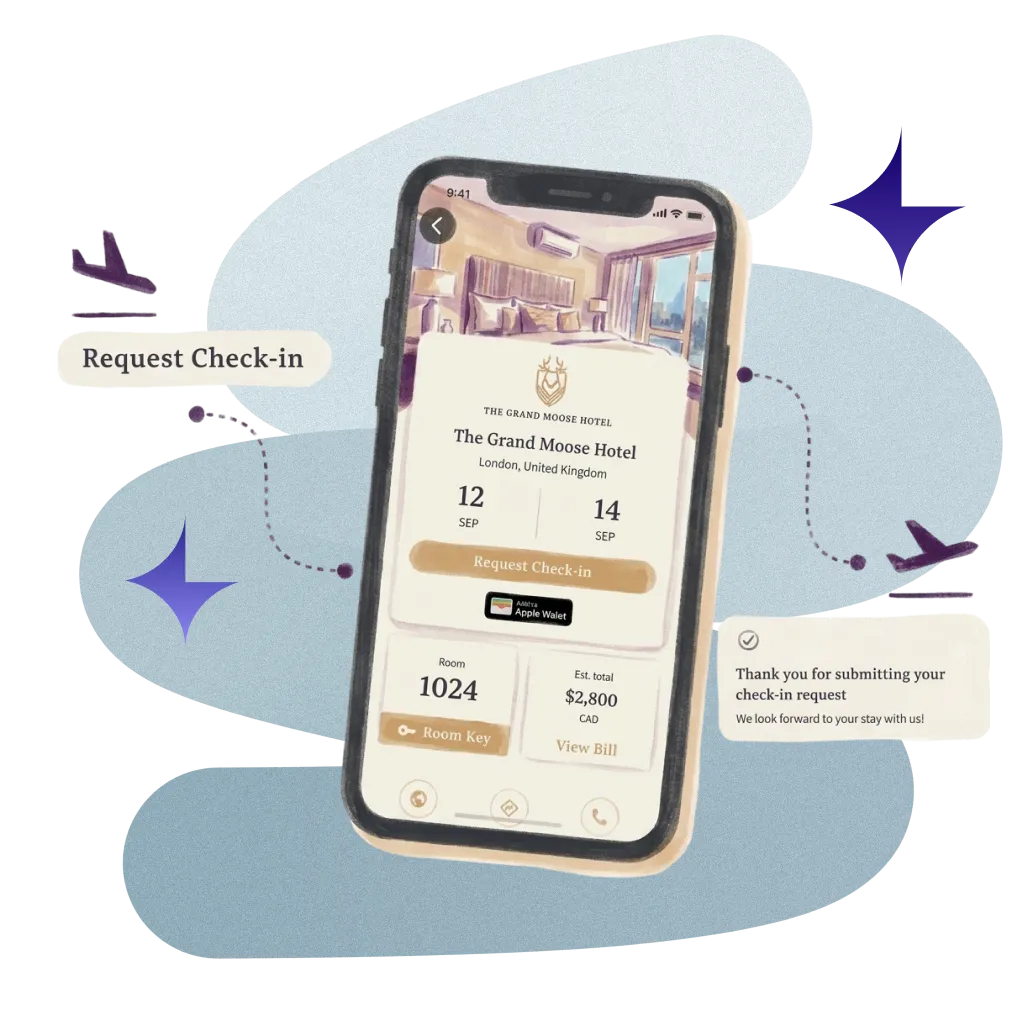
Let guests check in and out from their own phone.
Guests check in and out from their phone, so your front desk has shorter queues and more time for guests who want a conversation.


Secure Capture
Guests confirm arrival time, details and card, then sign your registration card and terms before they arrive.

ID Verification
Guests verify their photo ID on their own phone before arrival, and your team sees the result on the check-in.

Auto Room Assignment
Rooms are assigned and check-ins approved automatically, with a digital key sent the moment the guest is approved.

Automatic Notifications
Guests hear the moment their room is ready, and can only claim it once housekeeping has signed it off.
Real hotels.
Real feedback.
Real Feedback.
Hear from the hotel teams who work with us every day.
Automate ordinary
Deliver extraordinary
Married yesterday. Bubble bath today.
Checked in from the plane. No forms, no broken pens. Just congratulations.

Skis on at 10:00. Room ready at 14:00.
A text the moment it's signed off. No "is it ready yet?" every 10 minutes.

Swapped the desk for a welcome cocktail.
Checked in, key in hand. Poolside margaritas in T-minus five minutes.

Your systems, finally talking to each other.
You do not need more software. You need fewer tools that work together. Alliants puts the whole stay in one place.


























Upgrade your digital guest journey today.
With decades of hospitality knowledge, our experience experts know how to deliver change for your property.

Questions? Answers.
Straight answers for hotel people who want to know how it works.
The Basics
What is Contactless?
Contactless lets guests check in and out from their own phone. Before arrival they confirm their details, arrival time and card, verify their ID, and sign your registration card and terms. During the stay they hear when their room is ready, and at the end they request check-out from the same guest web app.
Who on our team uses it, and does it replace the front desk?
No, it does not replace the front desk. Front office, reservations and guest services teams use it to see what each guest has completed, with queues for arrivals and departures. Guests who want a conversation still get one, and those who prefer their phone skip the queue.
For Your Guests
What do guests do before they arrive?
They work through a short checklist on their stay page. Guests review stay details, address, emergency contact and additional guests, prefilled from the booking; choose an arrival time within the hours you allow and add special requests; add a payment card in the payment provider's secure form; and sign your registration card and terms. The checklist shows what is done and what is left.
Can guests verify their ID on their phone?
Yes, if you switch it on. Guests verify their photo ID on their own phone during check-in, and we capture their explicit consent first. Verification runs on Incode, and your team sees the outcome on the check-in sheet.
Can guests use the ID in their Apple Wallet?
Yes, where it is available. At the ID step, guests can share the driver's licence, state ID or US passport Digital ID held in their Apple Wallet, with optional checks that the surname matches the booking and that the guest is over 21. Properties can also let guests complete ID checks at the front desk instead. Availability depends on your property; ask your Alliants contact.
How do guests know their room is ready?
You choose. With the room-ready journey switched on, checked-in guests get a push notification or text when their room has been inspected. Where your PMS reports room readiness, you can also make sure guests can claim their room only once it is ready.
Do guests get a digital key when they check in?
Yes, with Alliants Digital Keys switched on. A key is delivered as soon as the check-in is approved, on Salto, dormakaba (including LEGIC) and Assa Abloy (including Vostio) locks. iPhone guests add it to Apple Wallet from the guest web app; Android guests use your hotel's own app.
For Your Team
What does our front desk see?
A dated queue of upcoming arrivals and their check-in status, where staff assign rooms and submit check-in on a guest's behalf. Each booking has a check-in sheet showing every completed step, the signed registration card and why self-service check-in may be blocked. The Today page lists arrivals with contact details and status.
Can rooms be assigned automatically?
Your team decides, property by property. With it switched on, rooms are assigned and check-ins approved automatically when a guest completes check-in, and a digital key can be sent as soon as the guest is approved. Otherwise staff assign rooms from the arrivals queue.
Can we choose the check-in steps?
Yes. You build the check-in and pre-arrival flow from step templates for your brand, with property overrides and required fields. Rules set when online check-in opens, by booking status, arrival day and your open time, and booking codes can hide steps or block self-service. Adding your own questions as custom steps is also possible. Availability depends on your property; ask your Alliants contact.
Do we keep a record of what each guest signed?
Yes. The signed registration card is saved as a PDF and shown on the staff check-in sheet. The exact terms each guest agreed to are frozen at signing, so later edits to your terms never change the record. Every check-in, check-out and booking status change is recorded in an audit log.
Set-Up and Integrations
Which property management systems does it work with?
Check-in and check-out are confirmed with HotelKey, Apaleo and Mews (switched on per property), and Shiji provides room readiness and receives registration cards. Check-out is also written back to other connected systems, such as OPERA Cloud, Stayntouch and Infor. Failures show in the staff app with a retry. Check-in write-back to Oracle OPERA, Infor and iRECKONU is also possible. Availability depends on your property; ask your Alliants contact.
How is Contactless set up?
We switch Contactless on for your brand and configure each property during onboarding: check-in steps, arrival hours, automatic room assignment, key delivery, PMS write-back and vehicle capture. Staff use alliants.ai in any modern browser, and guests use a web app that opens from a link, with nothing to download.
Security and Data
Is Alliants certified for information security?
Yes. Alliants is ISO 27001 certified. Security is built into the platform, from how staff sign in to how guest data is stored and erased.
Where is our data hosted?
On Amazon Web Services, in one regional deployment for your brand: Europe, the United States or Asia Pacific. Each brand has its own dedicated database, and data is encrypted in transit. Signatures and registration cards are stored privately and opened only by short-lived links.
How do our staff sign in?
With your own single sign-on, so access follows the groups in your staff directory, or with passkeys and passwords that meet your brand's rules. Multi-factor authentication can be required for your brand, and access is removed as soon as a colleague is deactivated.
How do you handle guest data requests?
When a guest asks to be erased, the request clears their data across related records, including registration cards, and data past your retention period is removed. We capture explicit consent before any ID check, and minors are never sent to your PMS.
Getting Started
Which bundles include Contactless?
Contactless is part of the Seamless Bundle and the All-In Bundle. Pricing is agreed for your properties, so talk to our team about which bundle fits.
How can we see it working?
Talk to our team. We will show you Contactless running in a hotel like yours and talk through how it would fit your properties and systems.
Have more questions?
Or just want to get started?
Talk to a real person. We know hospitality.
Alliants Contactless
Works even better with
Every Alliants product reads from the same guest profile, so each one makes the next more useful.
Alliants Digital Keys
Put the room key in the guest's wallet.

Alliants Kiosks
Self-service check-in for your lobby, without the queue.
Alliants Payments
Take payments securely, without ever handling a card.

Alliants Guest App
Your brand's digital front door, on web and mobile.
Certified, trusted and secure