How to structure pre-arrival communications that actually get guests using digital hotel keys
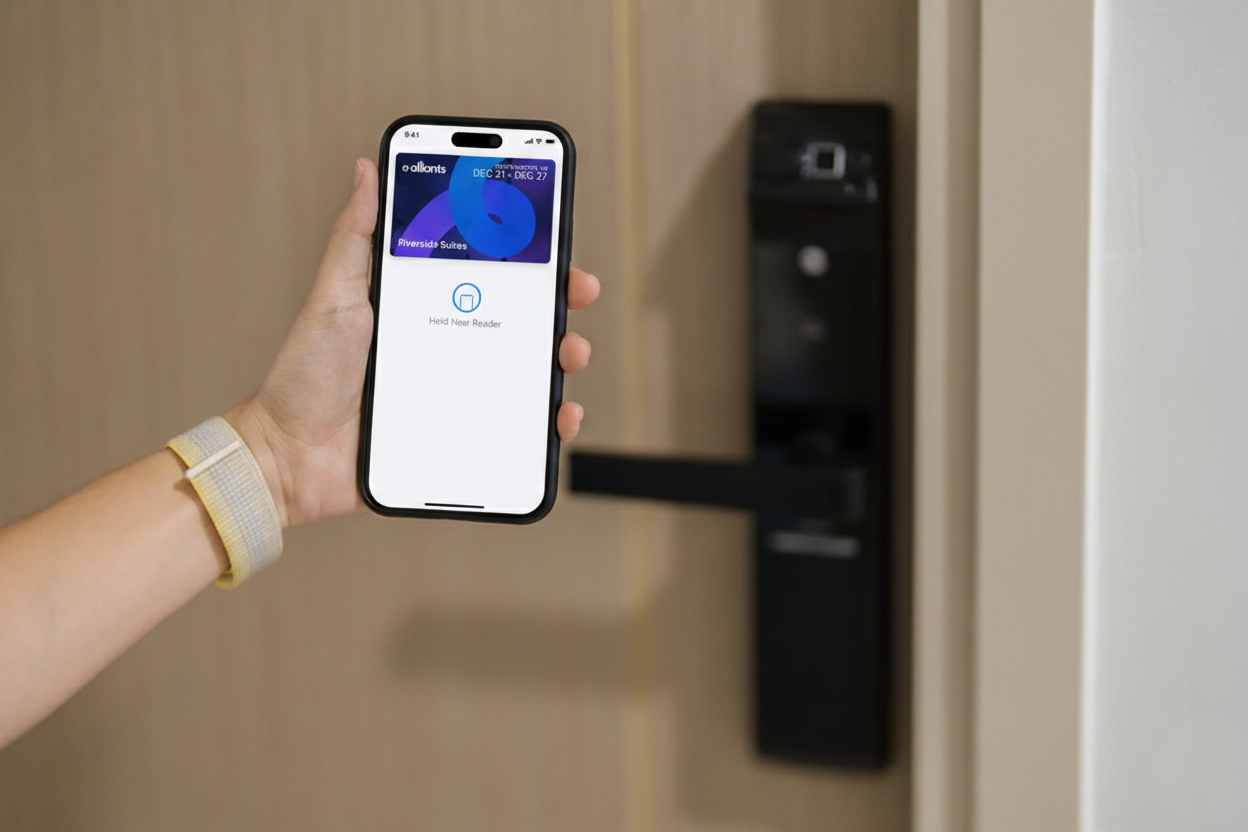
Digital keys have moved from futuristic novelty to standard hospitality tech. They’re quickly becoming an expectation, especially for guests who travel often and want to bypass lines, skip repetitive check-in questions, and get straight to their room. Unfortunately, there’s still a gap between offering digital keys and seeing consistent guest adoption. Most hotels don't struggle with the technology first. They struggle with communication.
When pre-arrival messaging is unclear, late, or overly promotional, guests ignore it. When it’s timed well, written in plain language, and designed around actual guest behavior, adoption increases. That’s true whether you offer digital room keys inside an app, through web-provisioning, or through wallet-based hotel keys that live where guests already spend time on their phones.
In this guide, we’ll break down how to structure pre-arrival communications that actually get guests using digital hotel keys, including best practices for Apple Wallet keys, Google Wallet keys, and a clear path to mobile room access.
Hotels often try to drive mobile wallet hotel keys adoption at the front desk. By that point, the guest is standing in the lobby, tired, juggling bags, and looking for the fastest path to the elevator. If the guest has not already set up the key, the likelihood that they will do it on the spot is low. If they do try, any sort of friction feels bigger than it truly is. A slow download, a password reset, or a confusing verification step becomes a reason to abandon the process completely.
Pre-arrival is different. Guests have more time, more patience, and more control over their environment. They're also in planning mode. They’re checking reservation details, scanning parking instructions, and coordinating arrival times. That's the best moment to introduce a mobile wallet hotel key or other smartphone hotel keys, as long as the message is useful and easy to act on.
Your goal is simple: make the first successful door unlock happen as close to arrival as possible and with minimal effort.
Guests don't wake up thinking, “I would love to try a new credential format today.” They're thinking, “I want to get to my room quickly.” Your messaging should reflect that job to be done.
Strong pre-arrival comms do three things:
If you offer a contactless hotel key, lead with the outcomes guests care about: skip the line, go straight to the room, and use the phone they already have.
A single message rarely does the job. A short sequence works better, as long as each message has a clear purpose and does not feel spammy.
This is your “heads up” message. It should be short and calm. It should frame the value and give a simple option to set up now or later.
At this stage, don’t overload guests with steps. Focus on clarity and confidence. Mention that digital room keys are available and that setup takes about a minute.
If you support wallet credentials, this is also a good time to mention that guests can use Apple Wallet keys or Google Wallet keys if they prefer a wallet experience over an app experience.
This is where you ask for the setup. The message should contain one primary call to action, such as “Set up your key now.” It should also clarify prerequisites, like identity verification or arrival readiness, in a friendly way.
If you support web-provisioned room keys, be explicit that the guest can complete setup in a browser with web-provisioning, without getting stuck in a long app journey. Guests often respond well when they feel the process will be quick.
This message should be very short. Assume the guest is in transit. Remind them that their phone can unlock the door and tell them where to find the key.
This is also where specific phrasing matters. Guests search their phone for the word “key” when they're standing at the door. Use that word.
Most guests will not read a long email. They will scan for a few keywords, decide if it applies, and either take action or ignore it. Your language should be direct and free of filler.
Here are principles that help:
If the guest can add a room key in Apple Wallet or a room key in Google Wallet, say that plainly. If the guest can use an iPhone wallet key, don’t bury that detail in a paragraph about convenience. Make it a simple option.
Pre-arrival comms are not just email. Hotels can use email, SMS, WhatsApp, or in-app messaging depending on region and guest preferences. The key is to match the content to the channel.
When sending links, keep them clean and trustworthy. If you use web-provisioning, make sure the URL clearly matches your brand domain and looks legitimate. Guests are rightly cautious about credential links.
Many guests already use payment cards, boarding passes, and tickets in their phone wallet. That means wallet-based hotel keys can feel natural, but only if you present them the right way.
Instead of describing it as an integration, describe it as a place.
Then provide the exact outcome: “Tap your phone at the door for mobile room access.”
If you mention Apple Wallet integration or Google Wallet integration, keep it as supporting context, not the headline. Guests care less about integration language and more about whether the key works quickly when they arrive.
Also note that guests may share access with a partner or family member. If you support Apple Wallet key sharing, it’s a meaningful feature for families and group travel. Introduce it as an optional benefit, not a required setup step.
Across properties, the same issues repeatedly stop guests from completing setup.
1) Unclear Prerequisites
If a guest must verify identity or confirm arrival details before keys can be issued, tell them up front. Do it in one sentence.
Example: “For security, we will ask you to confirm your ID during setup.”
If your system supports web-provisioned room keys, explain that the verification happens during the same flow, not as a separate support call.
2) Too Many Steps
Guests abandon setup when the process feels open-ended. Use time estimates and step counts, and be honest.
Example: “Setup takes about 60 seconds.”
If you offer a phone wallet key option, highlight that it reduces repeat logins. A wallet credential can be faster to retrieve than opening an app, especially if the guest is already at the door.
3) Fear Of Failure At The Door
Guests worry that a phone-based key will not work when it matters. Address that directly.
Example: “If you prefer, you can still pick up a key card at the front desk.”
That reassurance is not a retreat—it’s a trust builder. Guests are more likely to try mobile room access when they know there’s a fallback.
The moment of truth is the first unlock. Your messaging should prepare guests for what it will look like and how to use it.
Use clear, simple instructions:
If the guest is using an iPhone, the phrasing “iPhone wallet key” can help guests self-identify what to look for. If the guest is on Android, “room key in Google Wallet” is specific and searchable.
This also helps reduce support tickets because guests don't have to guess whether the device needs to be unlocked or where the key lives.
Not every guest is the same. A road warrior wants speed. A leisure guest may want reassurance. A group guest may need sharing options.
Segmenting does not require a complex marketing operation. Start with simple rules:
If the wallet option is available, position it as a convenience choice. Guests who prefer Apple Wallet keys or Google Wallet keys often know immediately that they want that path.
Here is a simple structure that works well and stays human.
Subject: Your room key is ready on your phone
Body:
“Your digital key is available for your upcoming stay. You can use it to go straight to your room and skip the front desk.
Set up now: [link]
Prefer a wallet key? Add your room key in Apple Wallet or room key in Google Wallet during setup.
If you need help at any point, reply to this message or visit the front desk for a standard key card.”
This template supports guests who want mobile hotel keys, guests who prefer wallet-based hotel keys, and guests who want the reassurance of a fallback.
Pre-arrival communication is not just a marketing task, but a guest experience system. It touches messaging, identity verification, operations readiness, and service recovery. The hotels that win with digital room keys treat comms as part of the product experience, not as an announcement.
Alliants supports that model by helping hotels build a structured pre-arrival journey that is consistent, on-brand, and operationally realistic. Instead of relying on one generic email blast, properties can use Alliants-style orchestration to deliver the right message at the right time, with clear calls to action, helpful FAQs, and links that move guests into setup with minimal friction. Just as important, the experience can be designed to reduce failure points, like unclear prerequisites, confusing verification steps, or guests arriving at the door without knowing where their key lives on their phone.
Alliants also fits naturally on the service side of this workflow. When guests get stuck, they need fast answers in the same channel they are already using. A guest messaging layer can turn a potential “digital key didn’t work” moment into a quick resolution by giving guests simple troubleshooting steps, escalation options, and clear fallback guidance without forcing a lobby visit.
When your comms are timed correctly, written for real humans, and built around low-friction setup such as web-provisioning and web-provisioned room keys, guests do what they already want to do: arrive, unlock, and move on with their stay. That’s the point of modern access, whether it is a mobile wallet hotel key, a traditional in-app key, or any other form of mobile room access that meets guests where they are and supports staff when exceptions happen.
Tristan Gadsby is CEO of Alliants, based in Southampton, England.
The opinions expressed in this column do not necessarily reflect the opinions of CoStar News or CoStar Group and its affiliated companies. Bloggers published on this site are given the freedom to express views that may be controversial, but our goal is to provoke thought and constructive discussion within our reader community. Please feel free to contact an editor with any questions or concern.